
Captioning Quality Guidelines
Captions should include all meaningful audio in media, such as dialogue, narration, sound effects, and music descriptions. To ensure compliance with Title II requirements for digital access, captions should be accurate, consistent, readable, equivalent, and complete. This information is adapted from resources provided by the Described and Captioned Media Program.
Captioning Best Practices and Standards
Accurate
Quality captions maintain consistent accuracy in spelling, punctuation, and grammar.
- Ensure there are no errors in spelling, grammar, or punctuation, and that words are spelled consistently.
- Caption spoken content as delivered, while omitting unnecessary filler sounds such as “uh” and “um.” Use ellipses (…) for pauses or trailing speech and hyphens (-) for interruptions or abrupt changes in speech.
- Use italics to indicatevoice-overs, narration, off-screen dialogue, plot-relevant background audio, sound effects, and music.
Consistent and Readable
Consistent caption formatting improves comprehension, with captions displayed long enough to be read, synchronized with the audio, and positioned to avoid obstructing or being obscured by visual content.
- Captions should use standard sentence case, a clear sans serif font, and a font size and color that ensure readability on screen.
- Captions should be synchronized with the audio, limited to two lines, positioned to avoid obstructing key visual content, and formatted with logical line breaks that preserve readability and meaning.
Equal
Captions should preserve the complete meaning and intended message of the original material.
- Capture all meaningful spoken and audio content accurately, preserving meaning, intent, profanity, and relevant dialects or accents without paraphrasing or omission.
- Include audio context when needed, such as tone, volume, or delivery style (e.g., [whispering], [shouting], [singing]) to support understanding.
- Indicate the absence of audio with [silence], [no talking], or [no audio]; for videos with no audio throughout, display [silence] once at the beginning for 3 to 5 seconds.
Complete
Clarity is enhanced through accurate transcription of speech, speaker identification, and meaningful non-speech audio.
Identifying Automated vs. Human-edited Captions
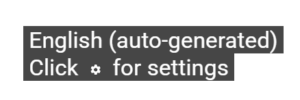
When you toggle on captions for a video on YouTube, text will appear in the upper left corner of the video. Captions labeled “English (auto-generated)” indicate they were generated automatically and have not been reviewed for accuracy by a human. As a result, they may contain errors and may not meet captioning quality standards.
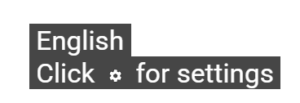
If the text reads “English”, the captions were likely created or edited by a human. These captions are more likely to meet the quality guidelines.
The Office of Information Technology has captioning tools that can assist with creating and editing captions in frequently used applications.
Please contact us at odscaptions@ua.edu if you have questions or need assistance with closed captioning accommodations.